
Disclaimer. Please access this technical project from a desktop or laptop computer. The formatting may not display optimally on mobile or tablet devices and could potentially hinder your understanding of the content. This project showcases my practical application and knowledge of JavaScript, HTML, CSS, and client-side A/B testing, demonstrating how website experiments can be built and implemented using front-end technologies without requiring a developer.
The website used for demonstration purposes is sourced from Anil Batra, a GA4 and GTM expert. I am not affiliated with Anil Batra or the website in any way. Concepts related to A/B testing and experimentation are inspired by training materials from Conversion Ideas by Ruben de Boer; however, I am not affiliated with Ruben de Boer or Conversion Ideas. While I am not a website developer, I regularly assist with implementing website changes and A/B tests in my professional work, this project is an independent educational demonstration.
Website A/B Testing with JavaScript, HTML & CSS
Project Overview

Business Consulting & CO.
Business Intelligence Analysts who help organizations leverage data for strategic decision-making.
Introduction
Our Business Consulting & Co. team partnered with an ecommerce client to implement website changes in a A/B testing environment designed to enhance the user experience and support ongoing experimentation efforts. The project involved applying front-end updates using HTML, CSS, and JavaScript. These changes focused on improving the presentation of key information and creating a clearer path for customers to evaluate products and complete purchases.
Objective
Implement practical webpage updates that align with common A/B testing strategies used in ecommerce conversion optimization. By adjusting elements such as messaging, layout structure, and visual components, the goal was to improve clarity for customers and create measurable opportunities to evaluate how design and content changes influence user behavior and purchasing decisions.
My Role
Assist senior website developers in developing and applying front-end modifications to an ecommerce page. This included writing and implementing HTML, CSS, and JavaScript updates to adjust page elements and improve the overall user interface. My focus was to ensure the changes were technically sound while supporting the client’s broader experimentation and optimization initiatives. As a Marketing Data Analyst, my role following implementation would be to measure the results of these changes within an A/B testing environment.

Why A/B Testing?
A/B testing allows organizations to make data-driven decisions by comparing different versions of a webpage, feature, or message to determine which performs better. Instead of relying on assumptions, businesses can measure how real users respond to changes. This helps improve user experience, increase conversions, and reduce risk when implementing updates. By continuously testing and learning, organizations can optimize their website and marketing strategies more effectively.
The Cost of Untested Website Changes
Making permanent website changes without testing can be costly and risky. Development teams are often small, expensive to operate, and already stretched thin maintaining systems and delivering new features. Each change request competes for limited developer time, slowing progress and increasing the likelihood that untested updates are pushed live without knowing if they will improve performance, or make things worse.
By supporting technical teams with front-end implementation and experimentation preparation, I help reduce this burden. At the same time, I assist leadership, including directors and VPs, by translating testing insights into strategic recommendations that guide more effective, data-driven website decisions.

Implemented Page Changes
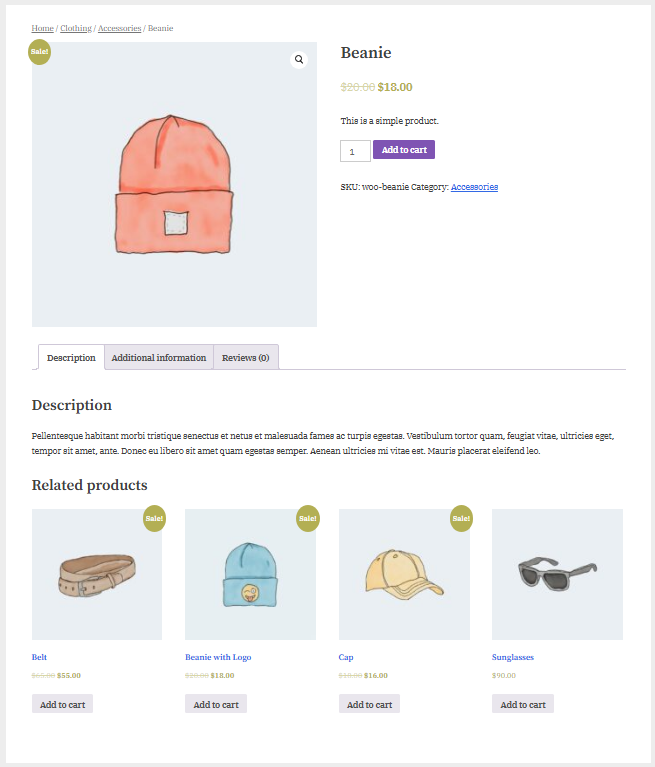
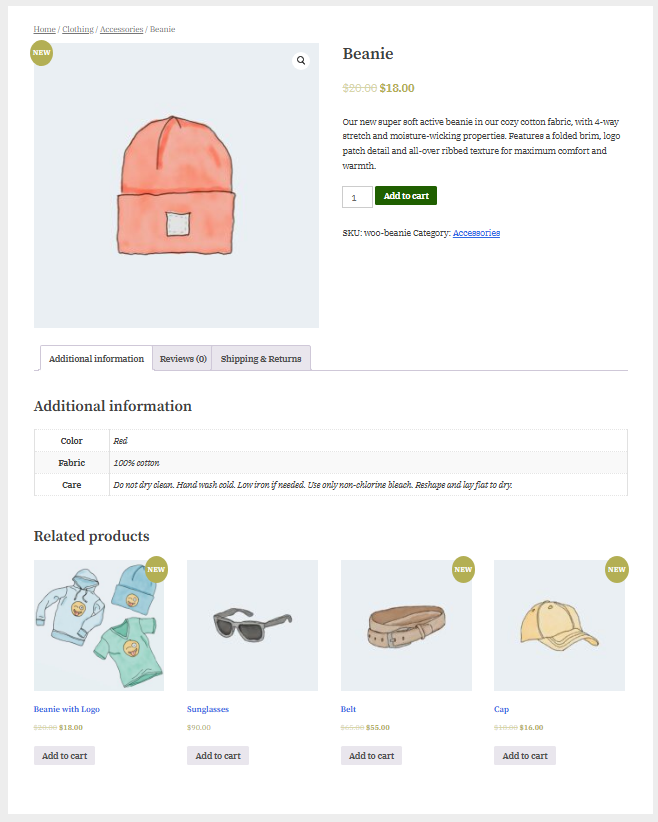
First, the promotional badge in the top-left corner of the product image was updated from “Sale!” to “NEW”, demonstrating how text elements can be dynamically replaced.
Next, the product information section was improved by replacing the placeholder text (“This is a simple product”) with the actual product description, positioning it directly under the product name and price to provide users with immediate context about the item.
The primary call-to-action button color was changed from purple to green using JavaScript (though the same change could also be implemented with CSS), illustrating how styling updates can be applied dynamically.
In the product information tabs, the Description tab was removed, causing the remaining tabs to shift left. A new tab titled “Shipping and Returns” was added to provide customers with additional purchasing information.
Within the Additional Information section, the product details table was expanded by adding rows for Fabric and Care, improving the completeness of the product specifications.
Finally, the Related Products section was reorganized by repositioning the Sunglasses product before Belts and replacing the default product image with a bundle image, demonstrating how elements can be reordered and updated. The href attribute of relevant links was also modified to support these changes.
Before
After
CSS
Controls how the webpage looks. It manages colors, fonts, spacing, and layout to create a clean and consistent design. This ensures the website is visually appealing and easy for visitors to read and navigate.
JavaScript
Makes the website interactive. It powers actions like button clicks, form responses, and dynamic updates. It also enables tracking and testing features, helping teams measure user behavior and improve the overall experience.
HTML
Builds the foundation of a webpage. It organizes the content—such as headings, text, images, and videos—so everything appears in the right place. Think of it as the structure that holds the entire page together.
Scripts Used:
-
document.querySelectorAll('.onsale').forEach(el => {
el.textContent = "NEW";
});document.querySelector(".woocommerce-product-details__short-description p").textContent ="Our new super soft active beanie in our cozy cotton fabric, with 4-way stretch and moisture-wicking properties. Features a folded brim, logo patch detail and all-over ribbed texture for maximum comfort and warmth.";
-
// Adds a row for Fabric and Care with paragraph to include details in table
const tableBody = document.querySelector(".woocommerce-product-attributes tbody");
if (tableBody) {
tableBody.innerHTML += `
<tr class="woocommerce-product-attributes-item">
<th class="woocommerce-product-attributes-item__label">Fabric</th>
<td class="woocommerce-product-attributes-item__value">
<p>100% cotton</p>
</td>
</tr>
<tr class="woocommerce-product-attributes-item">
<th class="woocommerce-product-attributes-item__label">Care</th>
<td class="woocommerce-product-attributes-item__value">
<p>
Do not dry clean. Hand wash cold. Low iron if needed. Use only non-chlorine bleach. Reshape and lay flat to dry.
</p>
</td>
</tr>
`;
}
-
// Remove the description tab
document.querySelector("#tab-title-description")?.remove(); //Note: The ? Only call .remove() if the thing on the left actually exists.
-
// Adds a tab for shipping and returns plus detains
(function () {
const tabsList = document.querySelector(".wc-tabs");
const additionalTab = document.querySelector(".additional_information_tab");
// Exit cleanly if WooCommerce tabs aren't present
if (!tabsList || !additionalTab) {
return;
}
// Prevent duplicate injection
if (document.querySelector("#tab-title-shipping_returns")) {
return;
}
// Clone existing tab
const newTab = additionalTab.cloneNode(true);
newTab.classList.remove("active");
newTab.id = "tab-title-shipping_returns";
newTab.querySelector("a").textContent = "Shipping & Returns";
newTab.querySelector("a").setAttribute("href", "#tab-shipping_returns");
// Insert after Reviews
const reviewsTab = document.querySelector("#tab-title-reviews");
if (reviewsTab) {
reviewsTab.after(newTab);
} else {
tabsList.appendChild(newTab);
}
// Clone content panel
const additionalPanel = document.querySelector("#tab-additional_information");
if (!additionalPanel) return;
const newPanel = additionalPanel.cloneNode(true);
newPanel.id = "tab-shipping_returns";
newPanel.style.display = "none";
newPanel.classList.remove("active");
newPanel.innerHTML = `
<h2>Shipping & Returns</h2>
<p>For delivery to Alaska or Hawaii, please allow 10-15 business days for delivery. For delivery to US Territories and APO/FPO addresses, allow three weeks for delivery. Gift Cards are shipped separately from merchandise.</p>
<p>For full refund to original payment method or merchandise credit, returns must be made within 30 days of the estimated delivery date of the last shipment or the actual delivery date of the last shipment, whichever occurs later.</p>
`;
additionalPanel.parentNode.appendChild(newPanel);
})();
-
//Moves the sunglasses (product 121) list item before the belt (product 119)
(function () {
var elementToMove = document.querySelector("li.product.post-121");
var referenceElement = document.querySelector("li.product.post-119");
if (!elementToMove || !referenceElement) return;
referenceElement.parentNode.insertBefore(elementToMove, referenceElement);
})();
-
// Change purple button to green with making it darker on hover.
(function () {
var button = document.querySelector(".single_add_to_cart_button");
if (!button) return;
button.style.backgroundColor = "#1f5f00";
button.style.borderColor = "#1f5f00";
button.style.color = "#ffffff";
button.addEventListener("mouseenter", function () {
button.style.backgroundColor = "#174a00";
});
button.addEventListener("mouseleave", function () {
button.style.backgroundColor = "#1f5f00";
});
})();
-
// Change picture of baseball cap to logo collection image
document.querySelector('.size-woocommerce_thumbnail').srcset =
"http://www.gapremium.com/eshop/wp-content/uploads/2022/03/logo-1-300x300.jpg";

Data Gathering Scripts:
Accurate data tracking is essential for reliable A/B testing because results must reflect what users actually experienced on the website. User behavior should only be recorded after the test variation has fully loaded and is visible to the visitor. If tracking occurs before the variation appears, the data may attribute behavior to a version the user never saw, leading to misleading conclusions. Because each A/B testing tool is different, the specific tracking requirements and implementation methods may vary.
-
gtag('event', 'AB test | ID1 | variant');
-
// Triggers a Mouseflow heatmap, survey, recording with a JavaScript trigger
window._mfq = window._mfq || []; window._mfq.push(['activateFeedback', '{FEEDBACK-ID}']);
-
// Scroll Tracking - Element In View (Single Fire)
var scrollEventSent = false;
window.addEventListener('scroll', function() {
if (!scrollEventSent && isInViewport('.YOUR_SELECTOR')) {
scrollEventSent = true;
console.log('element in view');
// Optional: Push to dataLayer
dataLayer.push({
event: 'element_in_view',
element_name: 'YOUR_ELEMENT_NAME'
});
}
});
function isInViewport(selector) {
var element = document.querySelector(selector);
if (!element) return false;
var elementTop = element.offsetTop;
var elementBottom = elementTop + element.offsetHeight;
var viewportTop = window.pageYOffset;
var viewportBottom = viewportTop + window.innerHeight;
return elementBottom > viewportTop && elementTop < viewportBottom;
}
Script Templates:
These are practical references I frequently use when implementing A/B testing changes. They include commonly used HTML structures, CSS selectors and properties, and JavaScript methods that help identify elements, modify content, adjust styling, and control user interactions on a webpage.
-
Get Element by ID: document.getElementById("header1")
Query Selector: document.querySelector(".uniqueClass")
Query Selector All: document.querySelectorAll("p")
Change Text: element.textContent = "New text!";
Change Inner HTML: element.innerHTML = "click here";
Change Outer HTML: element.outerHTML = "click here";
Remove Element: element.remove();
Change Href: element.href = 'https://www.Google.com';
Change ID: element.id = 'newId';
Click Event: element.onclick = function(){}
If Statement: if(condition){...} else {...}
Timeout: setTimeout(function(){},3000);
Console Log: console.log('AB test is running');
Interval: setInterval(function(){},100);
Insert Adjacent HTML: element.insertAdjacentHTML("afterbegin","<h3>text</h3>");
Insert Before: parent.insertBefore(newNode, referenceNode);
Clone Node: element.cloneNode(true);
Change Style: element.style.backgroundColor = "lightblue";
Change Multiple Styles: element.style.cssText = "background-color:lightgreen;border:2px solid darkgreen;padding:10px;"
-
HTML — Structure & Text
Heading 1: <h1>Heading 1</h1>
Heading 2: <h2>Heading 2</h2>
Heading 3: <h3>Heading 3</h3>
Heading 4: <h4>Heading 4</h4>
Paragraph: <p>Paragraph text</p>
Line Break: <br>
Horizontal Rule: <hr>
Bold (Semantic): <strong>Bold text</strong>
Bold (Legacy): <b>Bold text</b>
Italic: <i>Italic text</i>
Underline: <u>Underlined text</u>
Division (Block Container): <div>Content</div>
Span (Inline Container): <span>Text</span>
HTML — Links & Media
Anchor (Absolute Link): <a href="https://example.com">Link</a>
Anchor (Open in New Tab): <a href="https://example.com" target="_blank">Link</a>
Image: <img src="image.jpg">
iFrame (Embed Content): <iframe src="https://www.youtube.com/embed/videoID"></iframe>
HTML — Lists
Unordered List: <ul><li>List item</li></ul>
Ordered List: <ol><li>List item</li></ol>
List Item: <li>List item</li>
HTML — Tables
Table: <table>...</table>
Table Row: <tr>...</tr>
Table Cell: <td>Data</td>
Table Header Section: <thead>...</thead>
Table with Border Example:
<table border="1">...</table> -
ID Selector: #id
Class Selector: .classname
Multiple Classes: .class1.class2
Descendant Selector: .parent .child
Direct Child Selector: .parent > .child
Nth of Type: li:nth-of-type(2)
Nth Child: p:nth-child(2)
Hover Selector: #id:hover
Before Pseudo Element: .classname:before
-
Text Color: #ff0000;
Background Color: #ff0000;
Font Family: "Times New Roman", Times, serif;
Font Weight (Bold): bold;
Font Style (Italic): italic;
Text Decoration (Underline): underline;
Line Height: 30px;
Text Align: right;
List Style Type: lower-alpha;
Width: 15px;
Height: 20px;
Padding (Top Right Bottom Left): 5px 10px 10px 5px;
Padding Left: 15px;
Border (All Sides): 2px solid black;
Border Bottom: 10px solid black;
Outline: 3px dashed red;